Alex Karavai Listen Resumeopen to product design roles
8 years in product designLos Angeles, on-site or hybridauthorized to work in the US, no sponsorship neededResume (PDF)

Any name becomes a beat132 BPM

Up to eight letters. Each lit step is a note in D minor at 132 BPM.

Any name becomes a beat. Each letter lights steps on an acid line, D minor, 132 BPM.

Alex Karavai, product designer in Los Angeles

Product designer. I ship the apps, build the prototypes, and the tools that make them.

Open to full-time product design roles8 years, Los Angeles, on-site or hybrid, Authorized to work in the US, no sponsorshipTry my Suno concept

I ship consumer photo and gift apps used by millions, working day to day with iOS and web engineers, product managers and QA. I write the prototypes we decide with, and build the tools that do parts of my job for me. Before design, I ran a studio. On weekends, I make techno.

132 BPM, D minor, bar 1 of 8stems come in as you scroll: kick, bass, hats, pad
NowProduct designer at PlanetArt (title: UI/UX designer), the one designer for twelve consumer apps and eight stores across iOS, Android and web, paired with their engineering leads and PMs. Right now: the card designer, photo selection and the next round of A/B tests.
Looking forA full-time product design role, on a design team I can argue with in person. A creation tool where craft and code sit on the same desk is the dream; any good consumer team is welcome. Available with standard notice.
StackFigma, HTML/CSS/JS prototypes, Figma Plugin API, Claude agents, Ableton.

Self-initiated conceptConcept, not affiliated with Suno

Suno for producers: what I built when the song wasn't the point.

pattern 01, live demo, self-initiated, Oct 2026, independent concept, not a Suno product, built on public screens

The frustration. Every Suno generation on my phone hands me a finished three minute song. I want a 32 bar loop at 132 in D minor, and I want to keep the kick I like while the rest changes. Today the only move is roll the whole thing again. I am not the only one: the week V6 landed, the App Store reviews asked for the same thing.

The workaround. Cutting loops out of full songs, warping them to tempo, keeping notes on which generation had the good bass. Half the session went to bookkeeping.

The realization. The model cannot flip stems on and off, but Suno already reuses audio: Studio generates new stems in the context of the ones you leave on the timeline. So the verb is keep. A kept element stays as its exact audio and everything new is generated against it. Refuse means not this sound again: it is regenerated and left out of the next takes of this loop. Not lock: a padlock in Suno already means paywalled. A paid plan already has the parts, Sounds for a loop at a BPM and key, the stem splitter, and Studio on Premier. None of them keeps the kick while the rest changes in one tap. Keep and refuse is the feature. The same pattern fits any generator that hands back a whole: vary one region of an image, extend one shot of a video, keep the rest.

v0 on today's Suno. Make the loop in Sounds, split it, keep the chosen stems as audio, generate the rest in context the way Studio already does, export tempo-locked WAV stems and MIDI. The real risk is the model: whether new parts lock to the kept groove without bleed. That is the first question for the model team, not a design detail.

How I would know. Primary metric: credits spent per kept loop, where kept means downloaded or opened in Studio. Guardrail: credit revenue per paying user. Producers first because a loop is nothing but its parts; the control complaints below come from song makers too, and keep carries over to Song mode as keep this section.

what people say111 one and two star App Store reviews, US, Sep 18 to Oct 14
  • 36 of 111Control is gone. Prompts, style, vocal gender and the sliders feel ignored since V6. A reference that holds is the control they are asking for.
  • 15 of 111My upload is ignored. People record themselves, set audio influence to full, and get something else back. Keep as reference is that promise, kept.
  • 7 of 111Credits burn on re-rolls. Fewer re-rolls per kept loop is the credit story. My guess until measured: at launch a partial regenerate costs what a full one does.

The honest read: control is the biggest thing design can touch, and some reviewers ask for it by name: “bring back the hold option.” This is a scan of public reviews, not research with users.

three smaller things they point at
  • 13 of 111Stable controls. Buttons that move between updates read as a bug. A creation tool earns trust by staying put.
  • in the 15Voice verification that forgives. Three honest attempts failing in a row should route to a human, not a fourth try.
  • 2 of 111Provenance at download. Say what the file carries before it is on the phone, especially when the vocal is the user's own.

What I would test first. Whether "keep as reference" reads as hold or as favorite, with five producers and five people who upload their own voice, since those are the two groups the reviews point at, before any of this touches the Create form.
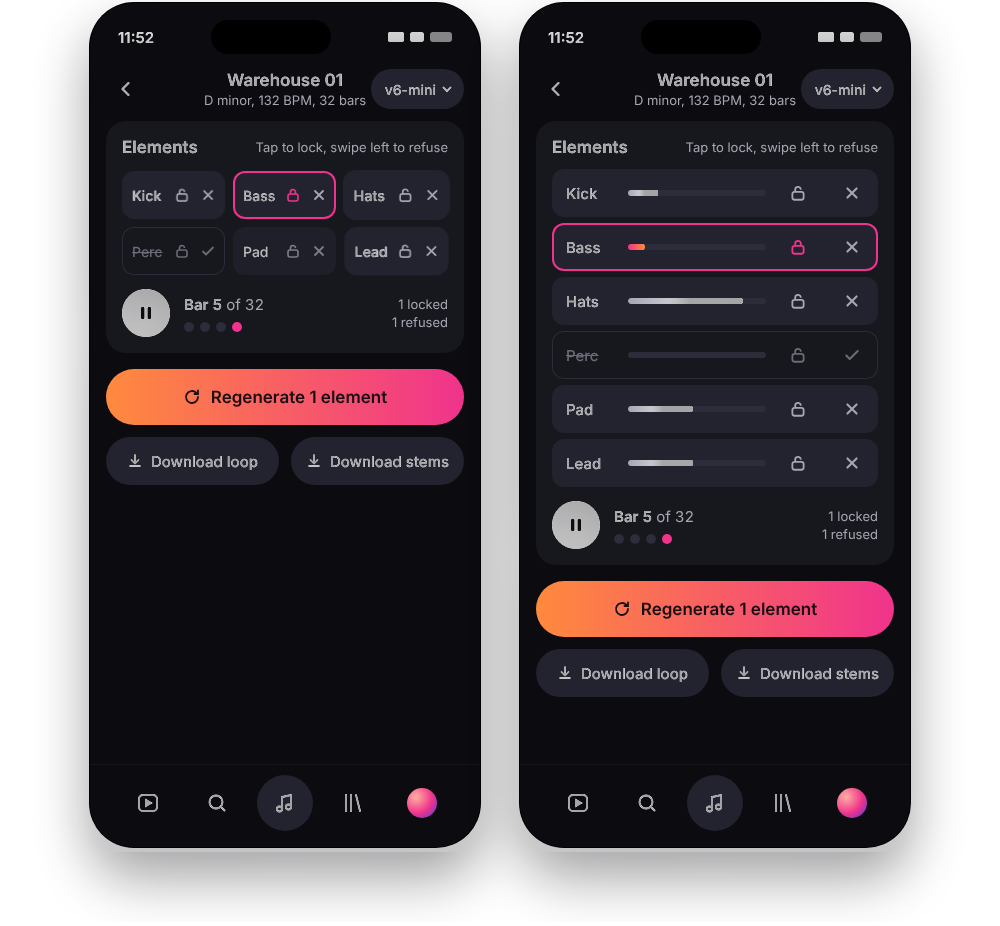
Live prototype two scenes, phone and webCreate, then playtap Create loop
how to play
  1. Loop is picked. BPM, key and bars sit where lyrics were. Leave 132, D minor, 32. On the web this is the Sounds tab.
  2. Create loop. A few seconds of generating, then the player with the loop running.
  3. Keep what you like. Tap the pin. Swipe left to refuse, right to mute. Long press to redo just that one.
  4. Regenerate. The button says how many it will redo and what it keeps. Reset starts over.
Motion Timed frame by frame from a screen recording of the Suno iPhone app.: player rises in 400ms and drops on release when you swipe it, sheets 350ms in, 250ms out, menus grow from the press and fold back in 150ms, Create lights up in Suno's moving fire gradient, generating copies the app: color-drifting cover, Untitled until element names land one by one, a status pill from the top cycling Suno's own lines, then Loop ready, keep 150ms ring, refuse 200ms fade to a stub, Undo holds 5s, reduced motion honored
the web app, desktop, traced from suno.com/create at 1440also on the web, suno.com/create

Same model, wider canvas.

Inside Sounds, the Create tab that already makes a loop at a BPM and key, then hands you one file. Elements, keep, refuse and Takes are what that tab is missing. One new field, Bars. Nothing else moves.

Click the pin and the row goes back to the model as reference. Same three verbs as the phone; hover shows what a swipe shows there. Arrows, K, M, Delete and R do it from the keyboard, with a focus ring so you know which row they hit.

A listening aid, not a decision. Hear the take without the hats, then choose. Mute does not change what Regenerate keeps.

The row fades to a stub in place with Undo, and the refused element is redone and kept out of the next takes. No confirm dialog; the stub is the confirm.

The button says how many it redoes and what it keeps. Kept rows hold still as audio; the rest shimmer and come back new. Suno says its own auto split labels are “not always correct”, which is the argument for generating elements apart instead of splitting a finished mix.

What the width buys. Every regenerate is a take that remembers what it kept, so you can go back to the one where the bass was right. Any take opens in Studio as stems. Studio is the timeline for people who want one; this is for everyone who never will.

Behind the demo

pattern 01, same bar, one job through my own department

Three calls I made: a pin, not a padlock; mixer rows over a chip grid; refuse with no confirm dialog. Agents built the rounds, I picked, changed and sent them back. From the job folder.

Two directions for Scene 2 on the same phone state: A, a 3 by 2 chip grid; B, mixer rows with meters.

1Two directions

directions.html, Scene 2 at 1440

Same loop and same state in both, so the only choice was the layout. I took B and changed the lock glyph to a pin.

2What I decided

rulings.md, 2026-10-09
  • Keep, not lock. A padlock in Suno means paywalled, so the row gets a pin and the model gets it as reference.
  • Change only what the concept adds. Everything else stays as Suno ships it, including the parts I would question.
  • Two scenes, no onboarding. The Create form with Producer mode on, then the loop with its elements.
  • Not added. Badges, hint pills, placeholder CTAs, chip captions, group labels, frames around controls, promo sheets, upsell rows.

3What I sent back

run-log.md, rounds 3 to 8
  • The key sheet stacked wrong. I caught it on my own screen recording, twice, before the fix held.
  • The desktop clip did not fit one screen. With its captions it needed a scroll. That note became the scrollytelling stage above.
  • Suno already splits stems. So the elements use drum and synth names a producer expects, not new vocabulary.
  • Refuse made the list jump. Rounds 5 and 6 fixed it in place.

Who did what. I made the calls and reviewed every round. My own agent setup built the rounds and checked them for overflow, contrast and motion before they reached me. More in Tools.

Work

pattern 02, bass in, 8 entries

Recent work that went live. More projects on request. Each one started as a prototype you could click. Test numbers stay inside the company; I can walk you through the readouts in a conversation.

    In progressLeading the Liquid Glass migration across twelve iOS apps. Case study when it ships.

    Big Heads, a face on a stick

    live, redesign speccedSimply to Impress2026open the prototype ↗live product ↗

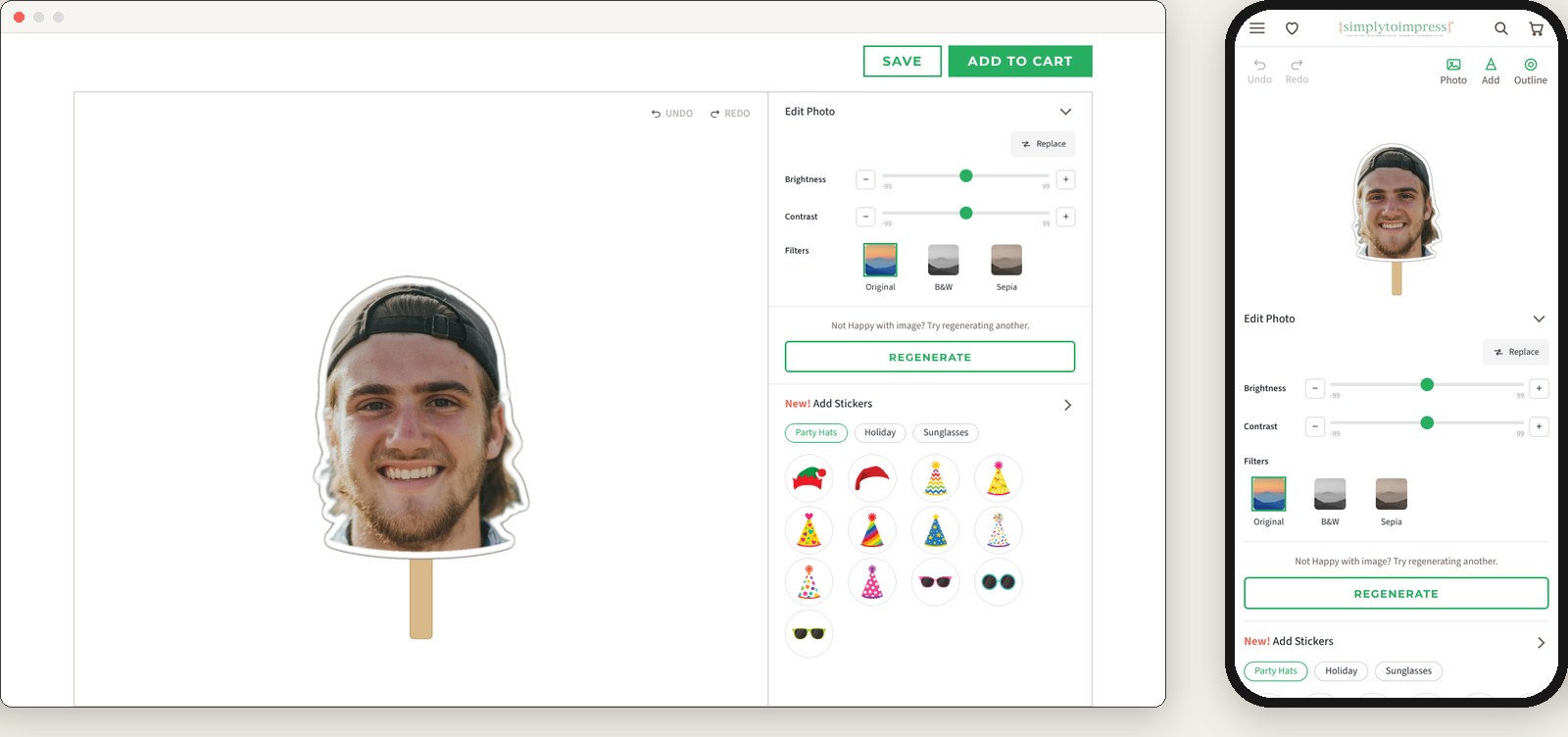
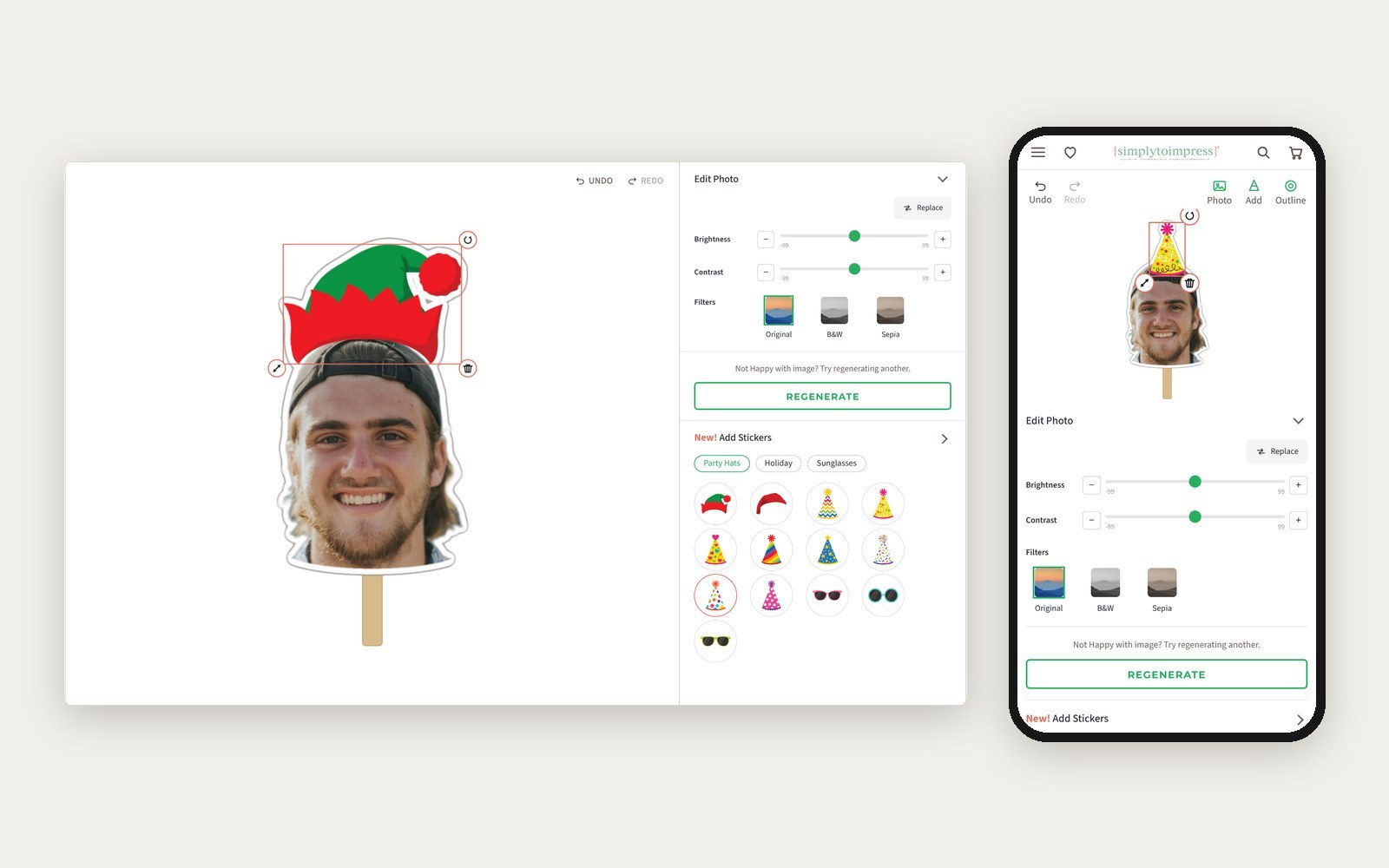
    A giant photo cutout on a stick. The empty board is the die-cut shape, and Add to Cart stays off until a photo lands. The background-removal promise comes before the upload, and the photo comes back cut to the jaw and sitting on its stick, with Regenerate beside Done if the edge is off. One tap selects the head, a second opens the editing sheet. Stickers are the new layer: category chips over a fixed-height tray, each hat sized from the head's own outline and kept clear of the board edge. Brightness and filters touch only the photo, never the cut line, so what you edit is what gets die-cut.

    The call. The cutout is the starting point, not a step. Undo starts disabled, so nobody can undo their way back to an empty board.

    Where it stands. Live with cutout, Regenerate, filters and the sticker layer. The tap model and fitted stickers are specced next.

    The working prototype, live. Switch desktop and mobile, add a sticker, try the filters. Stock photo

    Live prototype, tap and drag inside
    The Big Heads designer prototype on desktop and on a phone, a cut-out head on its stick with a hat sticker
    The working prototype, live. Switch desktop and mobile, add a sticker, try the filters. Stock photo

    A photo book that makes itself

    liveFreePrints Photobooks iOS2026

    Most people open a photo book app with a camera roll full of photos and no evening to spare. Now the app does the first pass: Select Photos groups the library into trips and events, Best Photos picks the sharp, well lit ones, and the book is put together while you wait. Then six short questions, each shown on a real spread instead of described in words: design it with AI or by hand, layout, order, cover, page colors, book style.

    The call. Let the AI make the first pass, and keep “I’ll design it myself” one tap away on every step. Nothing it picks is final; every selection can change later.

    Where it stands. Live in the FreePrints Photobooks app.

    FreePrints Photobooks on iPhone: Selecting Your Best Photos with a progress bar, the Best Photos grid with 19 of 19 selected, the wizard asking whether to design the book with AI, and the cover step offering to make the cover
    Best Photos picks first, then the wizard asks only what it can’t guess. Stock photos

    Checkout and conversion tests

    A/B tests with Data and GrowthSimply to Impress, FreePrints2025 to 2026

    One-page checkout and payment methods for the UK, Sweden and Poland. Each one started from the analytics with the data team, then Figma, then a test readout we read together.

    The call. Start from the analytics, not the mock. The variant answers a number the data team already has. The results are the company's; the method is mine to show.

    Where it stands. The one-page pattern had already performed well on Personal Creations and CafePress Business.

    The Simply to Impress one-page checkout on mobile, shown as one continuous scroll in three columns: email and name, address and shipping speed, then rush options, payment and Place Order
    The one-page variant, top to bottom: three checkout pages folded into one scroll, built on the live checkout. Test data

    Checkout without a password

    live on every storePlanetArt, desktop and phone2026

    When a guest types an email that already has an account, checkout now says so, sends a link and a four digit code, and lets them finish without a password. There is always a way out: use a different email, resend the code, or use a password after all. One pattern for every store, from CafePress and Personal Creations to Simply to Impress and Canvas World, each in its own brand.

    The call. Solve it inside checkout, not on a sign-in page, so nobody loses a cart to a forgotten password.

    Where it stands. Live on every PlanetArt store, desktop and phone.

    Guest checkout on CafePress desktop, then Personal Creations on a phone: the Account Already Exists dialog, the Check Your Email screen with a four digit code, and the expired code error
    One flow, every brand. CafePress on desktop, Personal Creations on a phone. Test data

    A whole store, designed end to end

    live, still extending it2025 to 2026open cafepress.com/business ↗

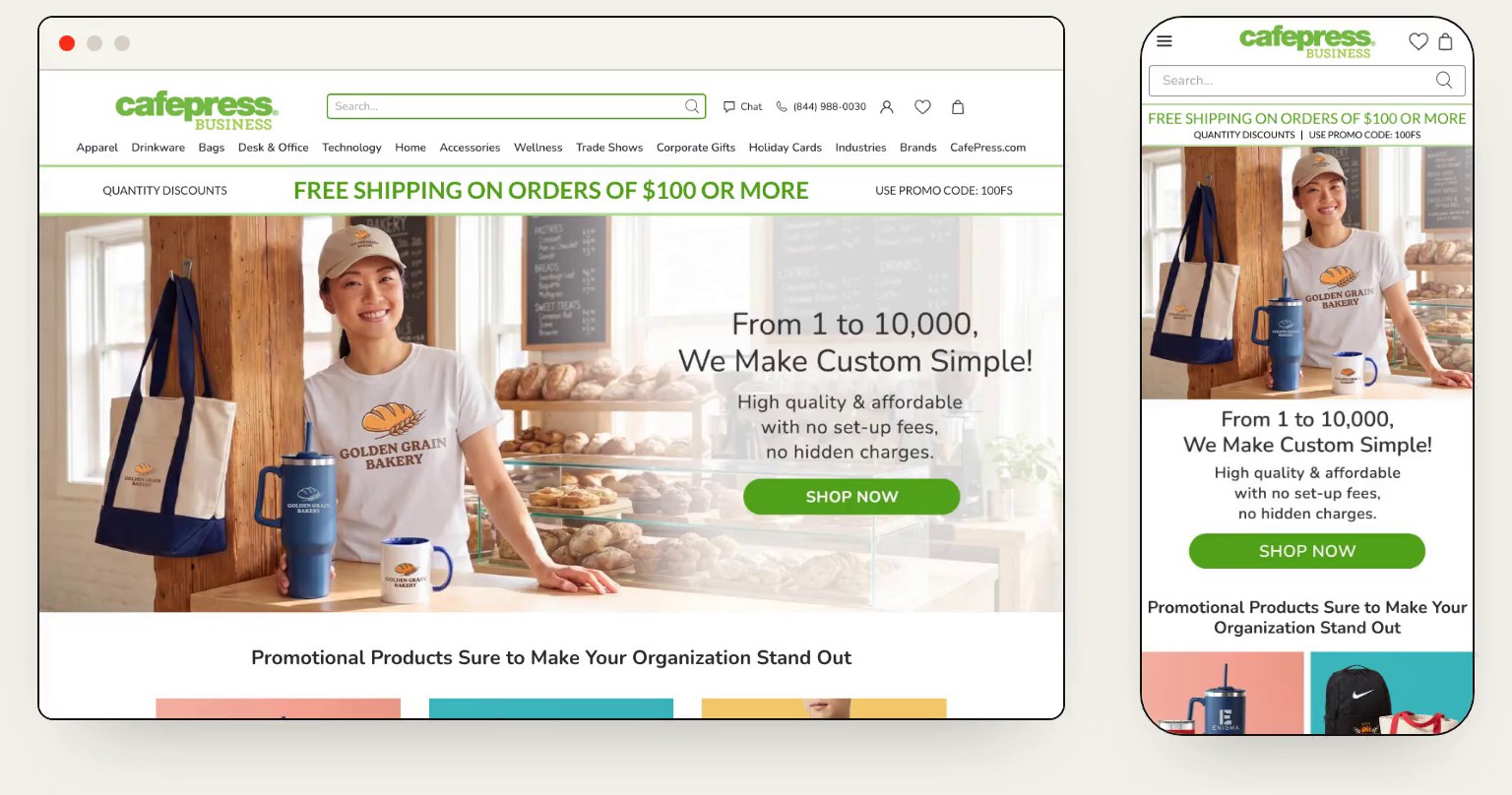
    CafePress Business is mine from the first template: home, category, product, cart, account and the logo upload, on desktop and on the phone. Nunito and Lato, one green, pill buttons everywhere, and a token set the mocks and the site share. The current chapter is Company Store, a branded shop a customer sets up for their own team.

    The call. One token set shared by the mocks and the site, so a change lands in both or neither.

    Where it stands. Live end to end on desktop and phone. Company Store is in progress.

    paused
    The live site, desktop at 1440 and phone at 390

    iseeme.com, the whole site and the book designer

    livePlanetArt brand2026open iseeme.com ↗

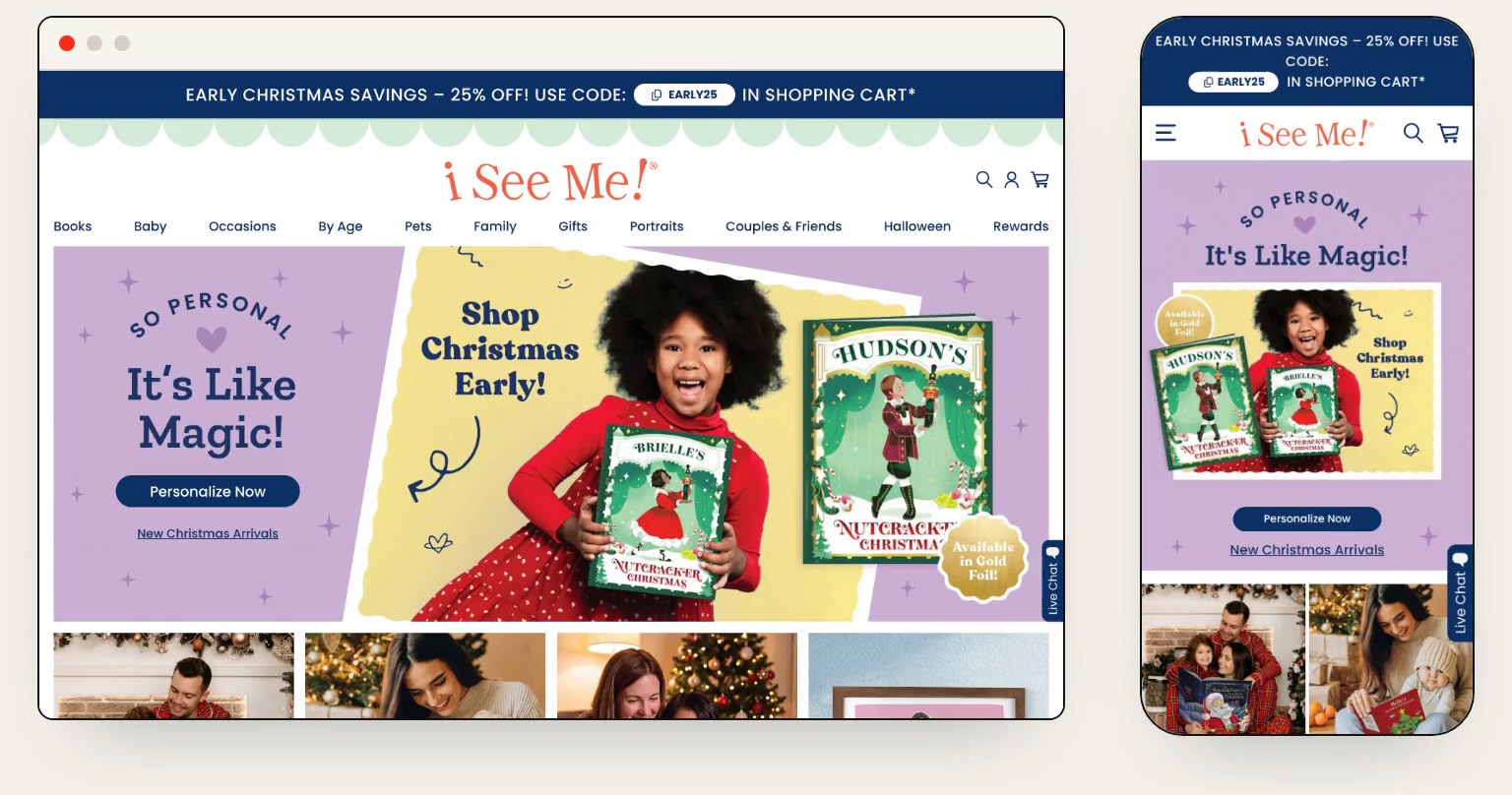
    PlanetArt's personalized children's books brand, redesigned end to end: home, category and product pages, and the designer where a parent types a name and watches the book change. Reviews moved up where they earn trust, the gift finder got real calls to action, the promo bar got quieter, the header wave went.

    The call. Spend the trust budget on reviews and the gift finder, and take the decoration out of their way.

    Where it stands. Live. The Ultimate Gift Bundle upsell is next.

    paused
    The live homepage, desktop and phone. Imagery by the iseeme team

    Tools I build

    pattern 03, hats in

    One designer serving twelve apps and eight stores. The only way that works is building things that do parts of the job without me.

    Agent systemin daily use, version 0.19

    Creative Department

    An AI design department I built and run from my desk and my phone. A director agent loads one client, questions the brief and routes the job to a specialist. Nothing reaches me until the gates pass and an independent critic scores it. When it needs a call, it parks on a card in Telegram I can answer while walking the dog.

    How it argues back and teaches itself

    It argues back now. Version 0.19 checks the premise before the plan: if the client's own analytics or live flow say the brief aims at the wrong problem, that is the first thing I hear, with the evidence. Every card carries the strongest case against its own pick, and anything it didn't look up this session is marked unverified instead of quoted from memory.

    How it teaches itself. The builder never grades its own work. Every call I make becomes a dated ruling the next job loads, and a past job with seven real rework loops is kept as a test it must pass. When my corrections pile up, a panel of agent personas argues them down to the few worth shipping. Each version starts from a miss:

    1. 0.17, Oct 13Motion and pre-ship reviews became gates, after the critic missed three motion regressions it couldn't see in stills.
    2. 0.18, Oct 14A gate that cuts any number it can't source, from one session of my corrections on this site: ten candidate rules, four kept.
    3. 0.18b, Oct 17Audits at real phone heights and opens every linked page, after it passed a prototype on this site taller than the phone screen.
    4. 0.19, Oct 19The premise check and the case against, the one idea worth keeping from a viral strategist prompt once a council had argued it down.
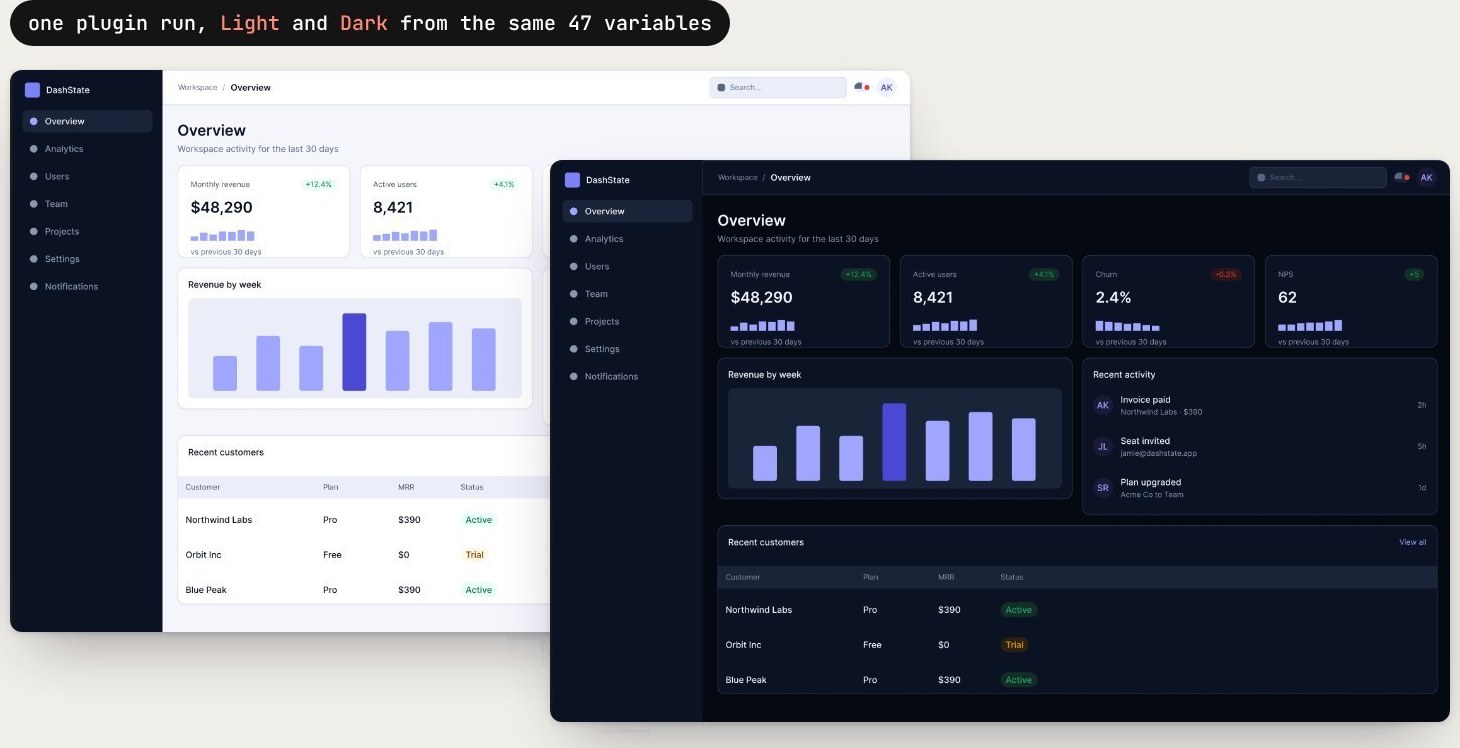
    Two generated DashState Overview screens, light and dark, layered: sidebar, four KPI cards, revenue chart, recent activity and a customers table
    The Overview screen the plugin writes, in Light and Dark from one set of variables
    Figma pluginpublished, Sep 2026

    DashState

    A plugin that writes a whole SaaS dashboard UI kit: real variables, light and dark, every component state, a states matrix, eight screens and a changelog.

    The Big Heads designer prototype running on desktop and on a phone: the cut-out head on its stick, the Edit Photo panel with filters, Regenerate and the sticker tray
    The Big Heads prototype as it runs, desktop and phone, built on the live designer. Stock photo
    Methodevery project since 2025

    Prototype pipeline

    Every project ships as one self-contained HTML prototype with live chrome, real motion and a spec panel, then gets pushed into Figma as the source of truth. So did this page.

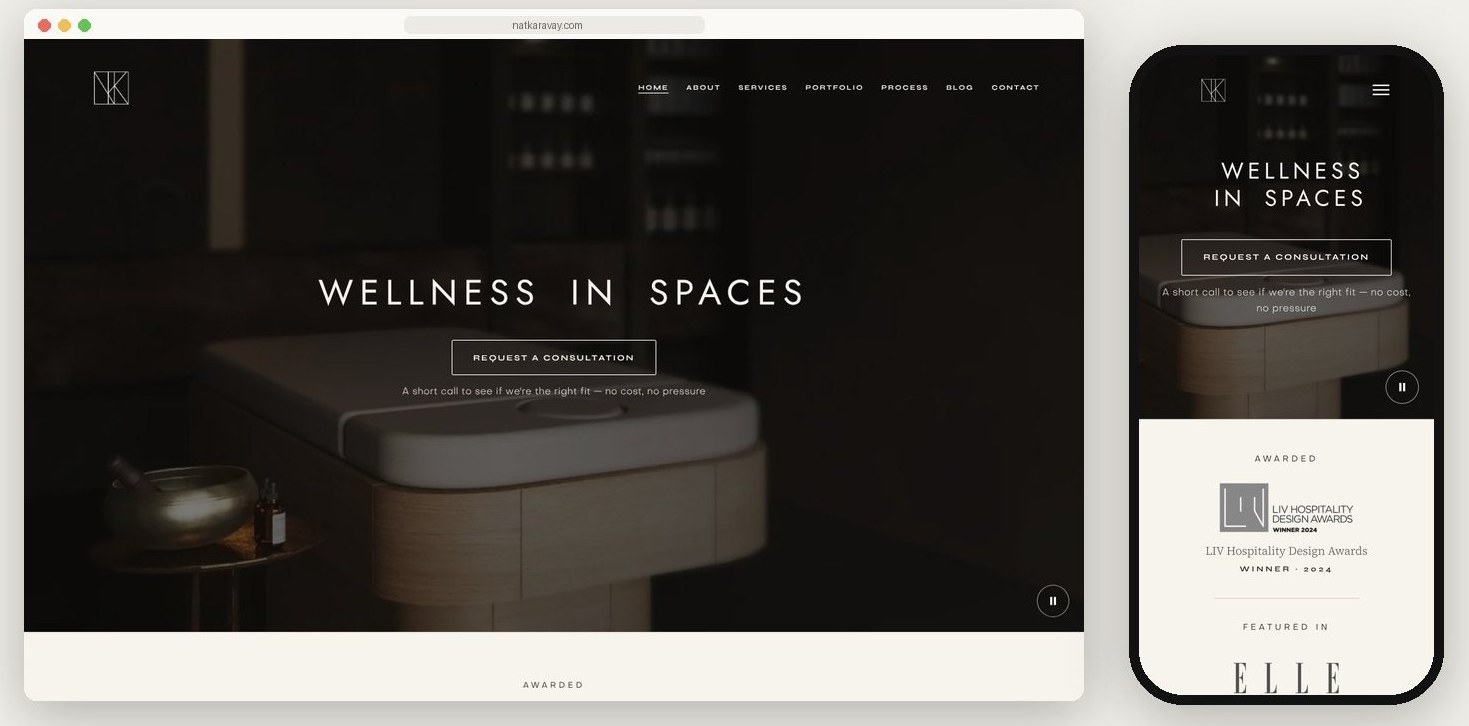
    natkaravay.com on desktop and on a phone: the Wellness in Spaces hero with a Request a consultation button
    The live site, desktop and phone
    Live sitedesigned by me, built with Claude Code

    natkaravay.com

    My wife's wellness interiors studio. I designed it and built it with Claude Code in Astro. The site has one job: real client conversations, not traffic. A teardown of competing studios set the structure. The phase-by-phase Process page sits in the main nav, because buyers choosing a designer read it and rivals bury theirs. Four area pages stay in the footer as search entry points. Every call to action leads to one inquiry form.

    Music

    pattern 04, pad in, as Alex Karavai, four tracks

    Techno in Ableton Live. Groove first: a 32 bar loop, then one sound at a time, each kept, parked or refused before the next. I wrote that method down as a skill so an agent can drive Ableton with me. Making music is why I care how a creation tool feels in the hand.

    Story

    pattern 05, full mix, 2014 to now

    I came to design from the other side of the table. Running a studio taught me that stakeholders are users too, and that a beautiful screen nobody can ship is just a picture.

    Building a creation tool people love? Let's talk.

    pattern 06, last bar

    I am looking for a full-time product design role in Los Angeles where craft and code sit on the same desk. Prototypes and walkthroughs available on request.